The Mera Ration app is a national government mobile app linked to the ration card system, and the safe way to get it is the official Google Play or App Store listing, never an APK file sent to you. It is meant for ration card holders, including those using One Nation One Ration Card, who want a phone-based way to deal with their card details.
- What is the Mera Ration app?
- Mera Ration app at a glance
- What is the Mera Ration app for?
- Who may find it useful?
- Mera Ration app download: how to get the real app
- Languages
- Signing in and your OTP
- Mera Ration app download APK and new version
- Mera Ration app login: who can sign in and how
- Mera Ration eKYC: what the app can and cannot do
- Mera Ration app not working: what to try
- Mera Ration app helpline number
- Mera Ration app kaise use kare
- What to do when the app and the shop disagree
- Safety: fake apps and OTP scams
- Conclusion
A plain word before you read on: we have not installed or tested this app for this guide, so we describe no screens. Instead of guessing what buttons you will see, this page covers what we can stand behind: what the app is for, how to get the real one, and how to protect your OTP. We are an independent information site, not the government and not the app developer.
- Open Google Play or the App Store and look for the app named "Mera Ration".
- Check the publisher name on the store listing before you install, and never install from a link sent on WhatsApp.
- Open the app and pick your language from its own language picker.
- Sign in only with your own mobile number or Aadhaar-linked details, and never share the OTP with anyone.
What is the Mera Ration app?
"Mera Ration" means "my ration". The app is a government mobile app connected to the national ration card system, and it is meant for ration card holders who want to use the card from a phone. It is a companion to the card, not a substitute: it does not issue, change or cancel a card, and it does not hold your ration. Your state food and civil supplies department and your fair price shop dealer still handle those tasks. It sits alongside the national portal described in our IMPDS portal guide.
Mera Ration app at a glance
| Item | Details |
|---|---|
| What it is | National government app for ration card holders, linked to the ration card system |
| Where to get it | Google Play or the App Store; the IMPDS portal (impds.nic.in) has a Download Mobile App menu listing "Mera Ration (Android)" that links to Google Play |
| Who it is for | Ration card holders, including families using One Nation One Ration Card |
| What you need | A smartphone and the mobile number linked to your record; sign-in steps were not tested by us |
| Cost | Not stated on the official page; nobody may charge you to activate it |
| Helpline | Not stated on the official page we read; take numbers only from an official portal |
| What it does not do | Issue, correct or cancel a card |
What is the Mera Ration app for?
"Mera Ration" means "my ration". The app is a government app connected to the national ration card system. It is meant for ration card holders, including those using One Nation One Ration Card, the arrangement that lets a card holder collect ration from a fair price shop in another state.
It is not a replacement for your ration card, and it does not issue, change or cancel cards. Those jobs stay with your state food and civil supplies department.
You may also see the name "Mera Ration 2.0". We did not confirm on an official page exactly what differs between versions, so go by what the store listing and your installed app say.
Who may find it useful?
- Families who live or work away from the state where their card was issued.
- Any card holder who prefers checking things on the phone to standing in a queue.
If you stay in your village and collect from the same shop every month, the app is optional. Your state portal and your dealer still work as before. For Telangana, the state site epds.telangana.gov.in is where card search and reports live, and our fair price shop guide covers shop details.
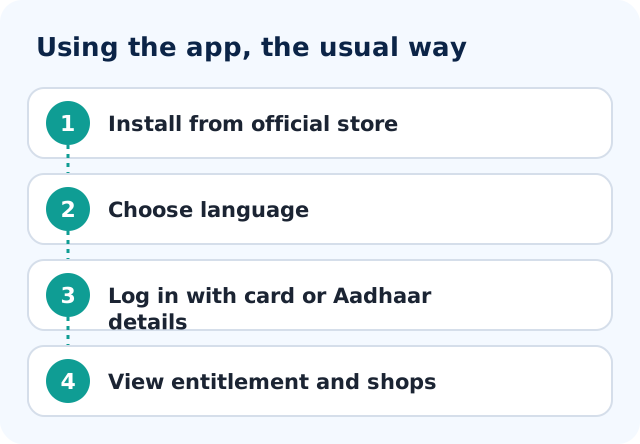
Mera Ration app download: how to get the real app
- Open Google Play (Android) or the App Store (iPhone).
- Search for the exact name "Mera Ration".
- Look at the publisher name on the listing. Look-alike apps with similar names and logos do appear in search, so do not install on the name alone.
- Check the download count, reviews and last update date. A brand-new app with few downloads is a warning sign.
- Install it, and allow only permissions that make sense. If an app asks for your SMS, contacts or screen without a clear reason, say no.
Download only from the official store listing. Never install the app from a link or an APK file that arrives on WhatsApp or SMS. We do not give a direct download link here because store links change.
One check you can make: the IMPDS portal, impds.nic.in, has a Download Mobile App menu with an entry named "Mera Ration (Android)" that opens a Google Play page. Starting from that official menu is safer than a search result. The same menu lists a separate app named Anna Mitra, so confirm you are opening the one called Mera Ration. We did not find an iPhone entry in that menu, so on an iPhone search the App Store for the exact name and check the publisher.
Languages
The app lists its supported languages in its own language picker. We have not tested it, so we cannot tell you whether your language is there. Open the picker after installing and see.
Signing in and your OTP
We have not tried the sign-in, so we will not describe its steps. What is true for any Aadhaar or ration card sign-in is this: an OTP, if one is sent, goes to the mobile number linked to that record, and it is useful to have that phone with you.
If you do not receive an OTP, the usual reason is an old or lost mobile number on the record. Fixing that is done through the proper channel, not the app. See ration card Aadhaar linking, and for Telangana record changes, Telangana FSC correction.
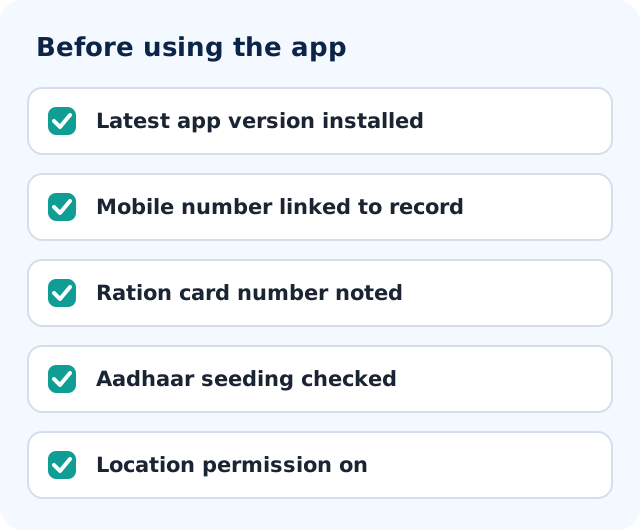
Mera Ration app download APK and new version
People search for an APK file because they cannot find the app or want a newer version. An APK from a website, a Telegram group or a WhatsApp forward is not the store-signed app, and fake apps are a common way to steal OTPs and bank details. We do not link to any APK. If the store shows an Update button, press it; if the app is missing for your phone, try the IMPDS portal link above, and otherwise use your state portal instead of an unknown file.
Mera Ration app login: who can sign in and how
We have not tried the sign-in, so we do not describe its steps. What holds for any such sign-in: an OTP goes to the mobile number linked to the record, you type it yourself, and no one from a helpline needs it. If it does not arrive, see the OTP section below and the checklist before you try again.
Mera Ration eKYC: what the app can and cannot do
We did not confirm on an official page that the app completes eKYC for a ration card. EKYC rules and places differ by state, and in Telangana the process is explained in our Telangana ration card e-KYC guide. Treat any app, link or caller that says it will do your eKYC for a fee as unsafe.
Mera Ration app not working: what to try
- Update the app from the store, then restart the phone.
- Check that mobile data or Wi-Fi works and that the phone date and time are set automatically.
- Clear the app cache from phone settings, or uninstall and reinstall from the official store.
- If the OTP is not coming, the linked mobile number is the usual cause; see the signing in section above.
- If the app still fails, use your state portal. For Telangana, see EPDS Telangana ration card status.
These are general phone checks, not steps published by the app developer. We cannot see server problems on the government side.
Mera Ration app helpline number
We did not find a helpline number for this app on the IMPDS page we read, so we do not list one. Numbers in forwarded messages or on unofficial sites may be false. For problems with your card, use your state grievance route; our national ration card grievance guide explains the national option.
Mera Ration app kaise use kare
Seedhe shabdon mein: store se sahi app install karein, apni bhasha chunein, apne record se jude mobile number se login karein aur OTP kisi ko na batayein. App ke andar ke screens hum ne test nahi kiye, isliye step-by-step buttons nahi likhe. See the download and sign-in sections above for the safe order of steps.
What to do when the app and the shop disagree
If the quantity you see on your phone differs from what the dealer gives, note the date and both numbers, keep your transaction slip, and ask the dealer politely first. If that does not settle it, use the state grievance route. For Telangana, see Telangana civil supplies grievance.
We did not find a verified complaint feature in the app to point you to. Take any helpline number only from an official portal, never from a forwarded message.
Safety: fake apps and OTP scams
- Type your OTP only into the official app on your own phone. Never read it out on a call.
- Ignore messages promising extra grain, cash or card approval if you install an app from a link.
- Nobody should charge you money to "activate" your app account.
- If an elder is being helped by a family member, let the elder enter the OTP themselves.
Conclusion
The Mera Ration app is a government companion for ration card holders, and it sits on top of the state systems rather than replacing them. Install it only from the official store listing after checking the publisher, never share your OTP, and use your state portal and civil supplies office for anything that changes your card.
Frequently asked questions
What is the Mera Ration app?
It is a national government app linked to the ration card system, meant for ration card holders including those using One Nation One Ration Card. It does not issue or change ration cards. We have not tested it, so we do not describe its screens.
How do I download the Mera Ration app safely (app kahan se download kare)?
Use Google Play or the App Store and check the publisher on the listing, or start from the Download Mobile App menu on impds.nic.in, which lists Mera Ration (Android). Never install from a link or file that comes on WhatsApp or SMS, and never pay for it.
Is the Mera Ration app APK safe to download?
No APK from a website or chat group can be trusted. Only the store listing gives you the signed app. Fake apps are used to steal OTPs, so install from the official store or the link on the IMPDS portal.
How do I log in to the Mera Ration app?
We have not tested the sign-in, so we do not give steps. An OTP, if sent, goes to the mobile number linked to your record. Type it only in the app on your own phone and never tell it to a caller.
Why is the Mera Ration app not working?
Common causes are an old app version, poor network, a wrong phone date or a mobile number not linked to the record. Update or reinstall from the official store. If it still fails, use your state ration portal. We cannot see server problems.
Can the Mera Ration app do eKYC?
We did not confirm that on an official page. EKYC rules differ by state; for Telangana see the e-KYC guide on this site and follow the state department. Do not pay anyone claiming to complete eKYC through an app.
Does the Mera Ration app work for Telangana ration cards?
It is a national app, so it is meant for card holders generally. For detailed Telangana card search and reports, the state portal epds.telangana.gov.in remains the place to check.
Is this website the official app developer, and what is its helpline number?
No. We are an independent information website and never ask for your Aadhaar or OTP. We did not find an official helpline number for the app, so we list none; use numbers shown only on official portals.