To check your FSC application search Telangana result, which is the ration card application status, open the FSC Application Search page on the civil supplies portal and enter your MeeSeva number or application number with the district. The page then shows the Application Status, where the file is pending and the rejected reason, if any.
- What is FSC application search in Telangana?
- FSC application search at a glance
- Ration card application status Telangana: where is the search page?
- How to fill the form: district, number, Search
- Where do you get the application number or MeeSeva number?
- How to read the RATION CARD DETAILS block
- What does "Pending At" mean, and what should you do?
- What does "Rejected Reason" mean, and what next?
- The member table: S No, Meeseva No, Aadhaar No, Member Name, Gender
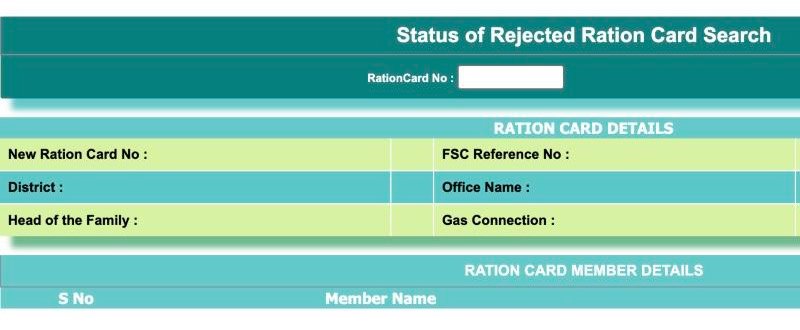
- Status of Rejected Ration Card Search
- FSC Search vs FSC Application Search: what is the difference?
- Ration card application status Telangana with Aadhaar number or mobile number
- How to check ration card application status with application number or MeeSeva number
- FSC search with shop number: is it possible?
- FSC application fee: is there any charge to search?
- FSC application search list and status: what the page shows
- FSC application search data not found: what to try
- Safety: fake sites and agents
- Conclusion
The page is not on the portal's home page, so many people never find it. Below is a walk-through of the real screen as we opened it on 20 October 2026, what each field means, and what to do when the result says pending or rejected. We are an independent site, not a government office, so we cannot check or change your application for you.
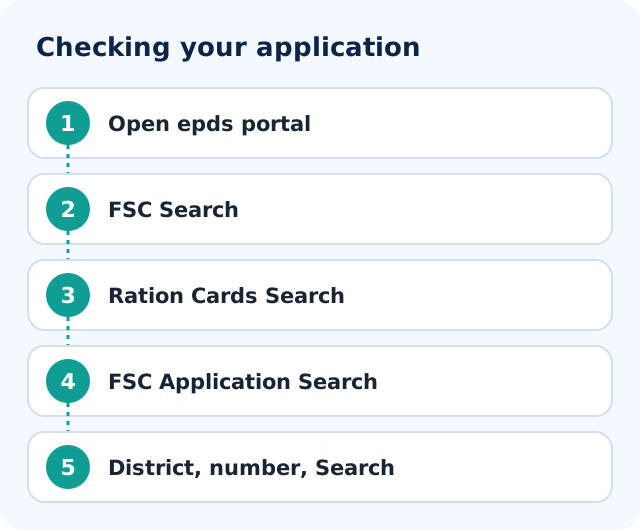
- Open epds.telangana.gov.in, click FSC Search, then Ration Cards Search, then FSC Application Search.
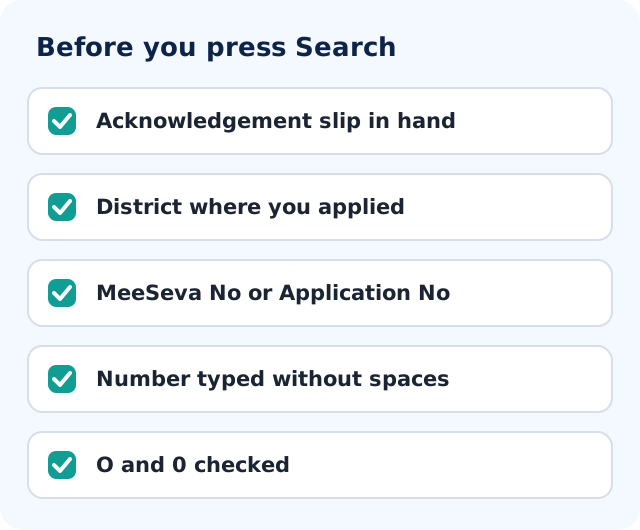
- Select the district where you submitted the application.
- Choose MeeSeva No or Application No, whichever your acknowledgement slip shows, and type the number without spaces.
- Press Search, then read Application Status, Pending At and Rejected Reason first.
What is FSC application search in Telangana?
FSC stands for food security card, the name used for the Telangana ration card on the civil supplies ePDS portal. FSC application search is the page where you look up a request that is still being processed, such as a new card application, using the MeeSeva number or application number printed on your acknowledgement slip together with the district. It is different from the ordinary FSC search, which looks up a card that already exists. The result block shows the application and card status, the office dealing with the file, the member names, and fields called Pending At and Rejected Reason. It reads records only; it does not let you submit, approve or change an application.
FSC application search at a glance
| Item | Details |
|---|---|
| Official portal | epds.telangana.gov.in, then FSC Search, then Ration Cards Search, then FSC Application Search |
| What you need | District where you applied, and a MeeSeva No or Application No from your slip |
| Who it is for | Applicants whose request is still being processed or was rejected |
| Cost | No fee is mentioned on the search page |
| Captcha | None seen on 20 October 2026 |
| Helpline | Not stated on the search page; use the contacts on the portal home page |
| What you get | Application Status, Current RC Status, Office Name, Pending At, Rejected Reason, member table |
Ration card application status Telangana: where is the search page?
It is not on the home page as a big button. You reach it through the card search page. Here is the exact path.
Step 1: Open the portal and click FSC Search
Type epds.telangana.gov.in in your browser. The page opens with the heading "Welcome to NATIONAL FOOD SECURITY CARDS". A large "Telangana Rising" banner pops up when the page loads, so close it with the cross at the top right. In the left-hand menu, click FSC Search (1). It is the first item.
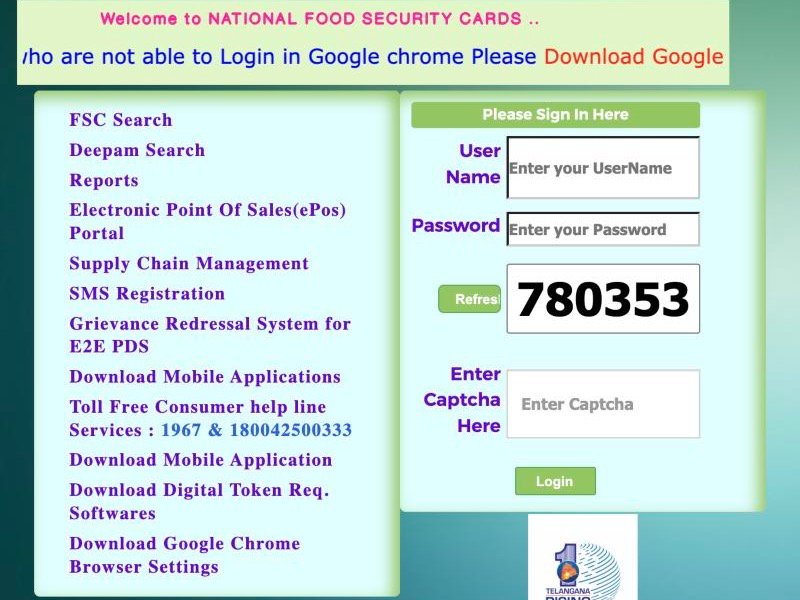 1
Step 2: Open the Ration Cards Search menu
At the top right of the new page there is a button called Ration Cards Search (1). Point at it and a small menu opens with the entries FSC Application Search (2) and Status of Rejected Ration Card Search (3), plus HOME. Click FSC Application Search.
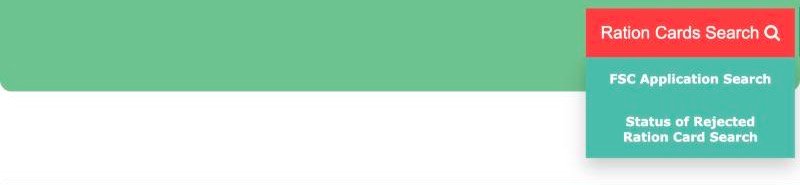 123
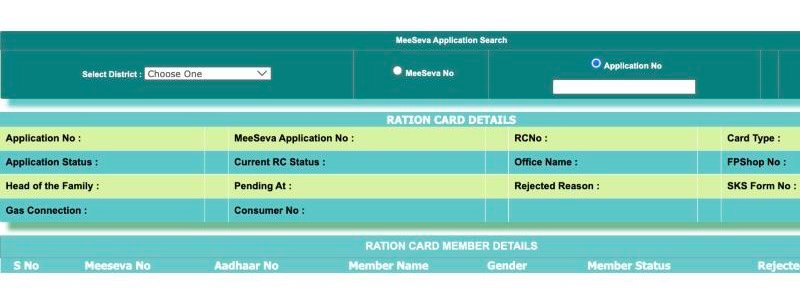
You are now on a page titled "FSC application Search", with a section called "MeeSeva Application Search". That is the right place for a request that is still being processed.
 123
How to fill the form: district, number, Search
The form is short. Three things matter, and the first one is the one people forget.
1. Select District
The drop-down starts at "Choose One" and then lists 33 districts (as seen on 20 October 2026), including newer ones such as Hanumakonda, Mulugu and Narayanpet, along with Hyderabad, Medchal, Ranga Reddy, Warangal and Yadadri Bhuvanagiri. Pick the district where you submitted the application, which may not be the district where you live today. A family that applied in Warangal and then moved to Hyderabad for work should still choose Warangal.
2. Choose MeeSeva No or Application No
There are two radio buttons. Pick the one that matches the number you are holding.
- MeeSeva No: use this if you applied through a MeeSeva counter and the slip carries a MeeSeva transaction number.
- Application No: use this if your acknowledgement carries a plain application number.
3. Type the number and press Search
Type the number exactly as printed. Do not add spaces. Watch for the letter O against the digit zero, and the letter I against the digit one. Then press the Search button. We did not see a captcha box on this form on 20 October 2026.
Where do you get the application number or MeeSeva number?
The portal does not show any format or sample for these numbers. Your number is on the acknowledgement slip or receipt you got when you applied, so type it exactly as printed there.
If the slip has more than one number, try each in turn. If you lost the slip, ask the counter or office where you applied to read the number from their record.
How to read the RATION CARD DETAILS block
If the number is found, a block headed RATION CARD DETAILS appears. Here is each field in plain language.
123| Field | What it tells you |
|---|---|
| Application No | The application number in the department's records. It should match your slip. |
| MeeSeva Application No | The MeeSeva number linked to the same application. |
| RCNo | The ration card number. If this is filled in, a card number exists for your file. If it is blank, none has been given yet. |
| Application Status | The state of your request, such as pending, approved or rejected. |
| Current RC Status | The state of the ration card itself, as against the state of your application. |
| Office Name | The office dealing with your file. Useful when you need to visit someone. |
| Head of the Family | The name the card is, or will be, issued under. Check the spelling. |
| Pending At | Where your file is waiting right now. More on this below. |
| Rejected Reason | If the file was turned down, the reason recorded against it. |
| Gas Connection | Whether a gas connection is linked to the family record. |
| Consumer No | The gas consumer number, when one is linked. |
What does "Pending At" mean, and what should you do?
This is the most useful field on the page, and the one people skip. It names the desk or level where your file is waiting. Think of it as the queue you are standing in.
What you do with that information is simple.
- Write down the exact words shown, and the date you checked.
- Check again after a week or so. If the words change, your file is moving, even if no card has come yet.
- If it stays the same for a long stretch, take your slip to the office named in "Office Name" and ask politely why the file is waiting at that stage. Quoting the "Pending At" text makes the conversation shorter, because the staff know where to look.
What does "Rejected Reason" mean, and what next?
If your application was turned down, the Rejected Reason field is where the department's stated reason appears. Read it slowly and copy it word for word. This one line decides what you do next.
- If the reason points to a data problem (a name, age or number that does not match), the fix is usually a correction or a fresh, clean application. Our guide on ration card rejection reasons and reapplying goes through the common cases.
- If you do not understand or agree with the reason, take the slip and a printout or screenshot of the result to the office named on the page and ask them to explain it. Offices can tell you what is needed; this website cannot.
- If you get no proper answer, you can raise a complaint. The grievance portal is covered in our note on the Telangana civil supplies grievance process.
The member table: S No, Meeseva No, Aadhaar No, Member Name, Gender
Below the main block is a second one, RATION CARD MEMBER DETAILS. It lists the people in your application, one row per person, with the columns S No, Meeseva No, Aadhaar No, Member Name and Gender.
Spend a minute here, because mistakes are easy to fix at this stage and painful later. Check that every family member is listed, that names are spelt the way they appear on Aadhaar, and that the gender column is right. If someone is missing, or a name is wrong, do not wait for the card to arrive. Tell the office from the Office Name field now.
The Aadhaar column is the reason to be careful with screenshots. If you share the result with a relative, cover that column first. Never post the full page in a public group.
If you need to add or remove a person from an existing card, that is a separate process, explained in adding or removing ration card members.
Status of Rejected Ration Card Search
 12
The third entry in the menu is a separate tool with one field, RationCard No, and a Search button. Use it only if you already have a card number. With just an application slip, stay on FSC Application Search. For the wider card check, see checking a ration card on ePDS Telangana.
FSC Search vs FSC Application Search: what is the difference?
Both live under the same FSC Search menu, but they answer different questions. Mixing them up is the most common reason for a blank result.
| Point | FSC Search | FSC Application Search |
|---|---|---|
| Use it for | A card that already exists | A request that is still being processed |
| You choose | FSCRefNo, RationCard No or Old RationCard No | MeeSeva No or Application No |
| District | Part of the form | Required drop-down of 33 districts |
| Captcha | Yes, with a Refresh button | None seen on 20 October 2026 |
| Shows | New Ration Card No, FSC Reference No, Card Type, FPShop No, IMPDS Status, Old RCNo and more | Application Status, Current RC Status, Pending At, Rejected Reason |
| Member table | S No and Member Name, with more columns | S No, Meeseva No, Aadhaar No, Member Name, Gender |
Our guide on FSC search in Telangana covers the card search in full. Once your card exists, downloading the FSC card is the next step.
Ration card application status Telangana with Aadhaar number or mobile number
Not on this page. The form offers exactly two ways to search: MeeSeva No or Application No, together with the district. There is no Aadhaar box and no mobile number box. If a website, an app or a stranger on WhatsApp says it can pull up your application with your Aadhaar or mobile number, treat that as a warning sign and keep your documents to yourself.
The member table does show an Aadhaar column once a record is found, but that is output, not an input. For the topic of searching without a card number, see what is possible with mobile number or name.
How to check ration card application status with application number or MeeSeva number
People type this in many forms, such as "how to check ration card application status online" or "ration card application status Telangana with application number". The answer is the same: select the district, pick the Application No option if your slip shows a plain application number, or MeeSeva No if it shows a MeeSeva transaction number, type it exactly and press Search. Both numbers are mentioned in the form section above, and the result confirms which one is linked to which. Hinglish readers asking "ration card application status kaise check kare" can follow the same steps: district chuniye, slip ka number daaliye aur Search dabaiye.
FSC search with shop number: is it possible?
Not on the application search page. The form has no shop number box; it takes only the district and either MeeSeva No or Application No. A fair price shop number appears as FPShop No in the result of the ordinary card search, and only for a card that already exists. To work with shops, see our guide on fair price shop details in Telangana, which explains the shop-wise reports on the portal.
FSC application fee: is there any charge to search?
We did not see any fee mentioned on the FSC application search page, and the lookup needs no payment. Any fee for applying for a card itself is a different matter and is set by the department or service centre, so confirm it at the counter. Do not pay an agent to "check" or "speed up" the search.
FSC application search list and status: what the page shows
People also search for "FSC application search list" or "FSC application search status". The page shows one application at a time, not a list of all applicants in a village or district. We did not find a public applicant list on the page. What you get is the single result block and the member table described above.
FSC application search data not found: what to try
Go through this list in order. Most blank results are solved in the first three steps.
- Check the district. Choose the district of application, not your present home district.
- Flip the radio button. Try MeeSeva No if you used Application No, and the other way round.
- Retype the number. Look for the O and zero mix-up, extra spaces, and a missing digit.
- Wait a few days. A form submitted very recently may not be entered yet, and government portals can also be slow or down. Try again at a quieter hour.
- Check you are on the right page. A card number typed into the application search will not work, and the reverse is also true.
- Go to the counter. Take the slip to the MeeSeva centre or office where you applied and ask them to confirm the entry exists.
If your problem is a name or detail in an issued card rather than a missing record, see FSC corrections in Telangana.
Safety: fake sites and agents
- Type the portal address yourself instead of tapping links forwarded on messaging apps.
- The search needs no sign-in. The "Please Sign In Here" box on the home page is for registered portal users, so never type passwords or OTPs into a site you reached through a forwarded link.
- Do not pay anyone to "check" or "speed up" an application. The status lookup on the portal is free.
- If you need help, take phone numbers from the portal's own home page, not from advertisements.
Conclusion
To recap: open epds.telangana.gov.in, go to FSC Search, press Ration Cards Search, and choose FSC Application Search. Pick the district where you applied, choose MeeSeva No or Application No, type the number from your slip and press Search. Then read Application Status, Pending At and Rejected Reason first, since those three lines tell you the whole story. Keep a note of what you saw and the date, and take it with you if you need to visit the office.
The portal can change its look or menu wording, so if a label differs slightly on the day you visit, follow the closest match and check with the office if in doubt. If you have not applied yet, start with applying for a new ration card in Telangana.
Frequently asked questions
How to check ration card application status in Telangana?
Open epds.telangana.gov.in, click FSC Search, then Ration Cards Search and FSC Application Search. Choose the district where you applied, select MeeSeva No or Application No, type the number from your slip without spaces and press Search. Read Application Status and Pending At first.
Ration card application status Telangana with application number: which option to pick?
Pick Application No if your acknowledgement shows a plain application number, or MeeSeva No if it shows a MeeSeva transaction number. If one does not work, try the other number on the slip, and double-check the district.
Can I check FSC application status with Aadhaar number or mobile number?
No. The application search form has no Aadhaar or mobile number box. It accepts only the district with a MeeSeva number or an application number. Be careful with any site or person claiming to find your application by Aadhaar or mobile number.
Ration card application status kaise check kare?
Portal epds.telangana.gov.in kholein, FSC Search, phir Ration Cards Search mein FSC Application Search chuniye. District chuniye, slip ka MeeSeva ya application number daaliye aur Search dabaiye. Result mein Pending At aur Rejected Reason padhein.
Can I do an FSC search with shop number?
Not on the application search page, which has no shop number box. A shop number (FPShop No) is shown in the ordinary card search result for an existing card. For shop-wise reports, see the fair price shop guide on this site.
Is there a fee for FSC application search?
We saw no fee mentioned on the search page, and the lookup does not ask for payment. Never pay an agent to check or speed up a status. Any fee for the application itself should be confirmed at the centre where you apply.
What does Pending At or Rejected Reason mean in the result?
Pending At names the desk or level where your file is waiting right now. Rejected Reason shows the department's recorded reason if the file was turned down. Copy both exactly, and take them with your slip to the office named in Office Name.
Why does FSC application search show data not found?
Usually it is the wrong district, the wrong radio option, or a typing slip such as the letter O for zero. Try the other number on your slip, wait a few days in case the entry is new, and ask the centre where you applied to confirm the entry exists.