FSC search Telangana is the free lookup on the Civil Supplies portal (epds.telangana.gov.in) that shows the household record behind one ration card. You type one of three numbers, solve a captcha and read the card and member blocks that appear. The steps below follow the live page as it looked on 20 October 2026, and later sections answer the other things people search for, such as shop number, Aadhaar, KYC and card download.
- What is FSC search Telangana?
- FSC search Telangana at a glance
- Who needs FSC search, and when?
- What should you keep ready before you start?
- How to do FSC search Telangana, step by step
- How do you read the Ration Card Details block?
- What does the Ration Card Member Details table show?
- FSC search Telangana with Aadhaar card or mobile number: is it possible?
- FSC search with shop number: what the portal does and does not do
- FSC Telangana shop list: how to see cards shop wise
- FSC search Telangana ration card download: can you save the result?
- FSC search Telangana KYC and MeeSeva application status
- FSC search Telangana new ration card list
- FSC search Telangana kaise kare (Hinglish)
- What other searches are in the Ration Cards Search menu?
- Why does it say "record not found", and what can you try?
- Is the FSC search free and safe?
- Conclusion
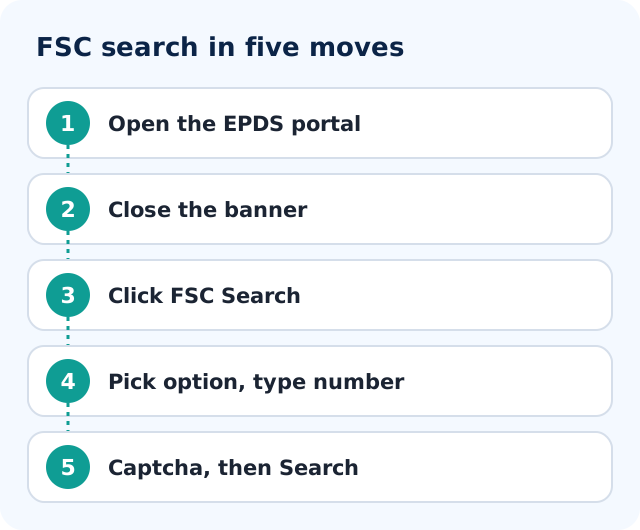
- Open epds.telangana.gov.in in Chrome and close the banner.
- Click FSC Search in the left menu.
- Pick FSCRefNo, RationCard No or Old RationCard No, and type that number.
- Enter the captcha, press Search, and read the card and member blocks.
What is FSC search Telangana?
FSC means Food Security Card, which is what Telangana calls the ration card issued under the National Food Security Act. FSC search is a free lookup page on the Telangana EPDS portal where you pull up the record behind one card: the card block with its numbers, status and fair price shop, and a table of the family members. It is a lookup, not an application, so nothing can be changed from it.
This website is independent. We are not the Telangana government, we do not handle cards, and we never ask for your Aadhaar or OTP.
FSC search Telangana at a glance
| Item | Details |
|---|---|
| Official portal | epds.telangana.gov.in, menu item FSC Search |
| Search by | FSCRefNo, RationCard No or Old RationCard No, plus captcha |
| Login needed | No login, no Aadhaar and no OTP |
| Who it is for | Anyone holding a Telangana food security card number |
| Cost | Not stated on the official page; the portal asked for no fee |
| What you see | Ration Card Details block and Ration Card Member Details table |
| Not offered on the form | Search by Aadhaar, mobile number, name or shop number |
| Helpline | 1967 and 1800 425 00333, printed on the portal home page |
Who needs FSC search, and when?
People usually need it when the card is lost or the number is unreadable, when someone asks for the ration card number, when you want to check that all members are listed, or after a house move to see which fair price shop the card is attached to.
It is a lookup, not an application. You cannot change anything from this page. If something is wrong, you fix it through the correction route, which I cover in our Telangana FSC correction guide.
What should you keep ready before you start?
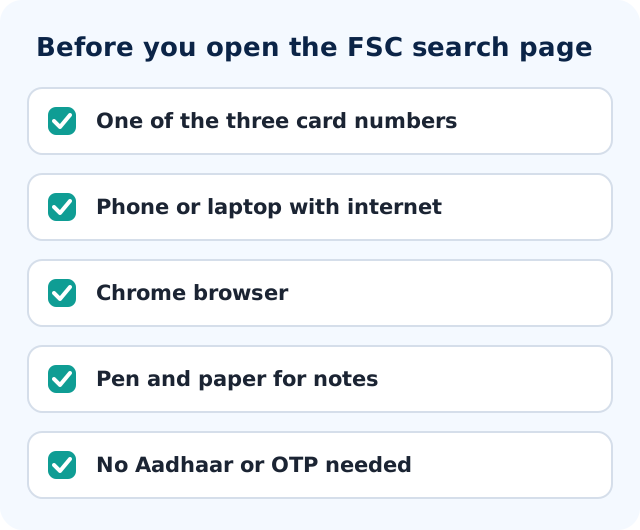
You need just one of three numbers, plus a phone or computer with internet. Look in the old booklet, the smart card, a past SMS or a MeeSeva receipt.
The three numbers the form accepts are:
| Option on the page | What you type | Where you usually find it |
|---|---|---|
| FSCRefNo | The FSC reference number of your household record | Old acknowledgements, earlier messages, earlier search results |
| RationCard No | The current card number | Printed on the card or booklet in use now |
| Old RationCard No | The number from your earlier card | Old paper cards that families keep in a drawer |
No login, no Aadhaar number and no OTP is needed for this search. If a page asks for those before showing you a card, you are not on the official portal.
How to do FSC search Telangana, step by step
Here is the whole process with screenshots taken on the live portal on 20 October 2026. Type the address yourself instead of tapping a link from a forwarded message. Look-alike sites exist, and the real address ends in gov.in. The red numbers on each screenshot match the numbers in the steps.
Step 1: Open the EPDS Telangana portal
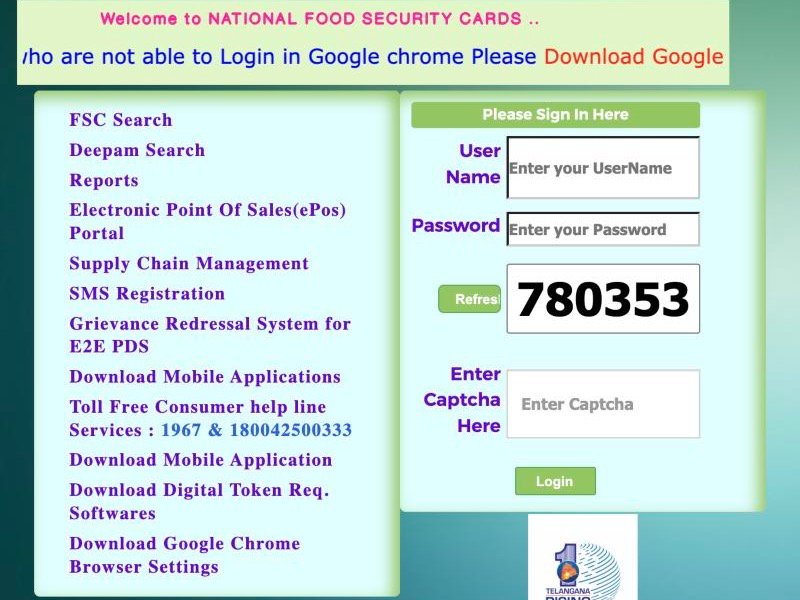
Open epds.telangana.gov.in in Chrome. The page that loads is titled Food Security Act and the heading says "Welcome to NATIONAL FOOD SECURITY CARDS". A large "Telangana Rising" banner covers the screen when the page loads, so close it with the cross at the top right. The menu is on the left: FSC Search (1) is the first item. The toll-free numbers 1967 and 1800 425 00333 are printed on the same page (2). The sign-in box on the right (3) is not needed for searching a card.
 123
Step 2: Click FSC Search
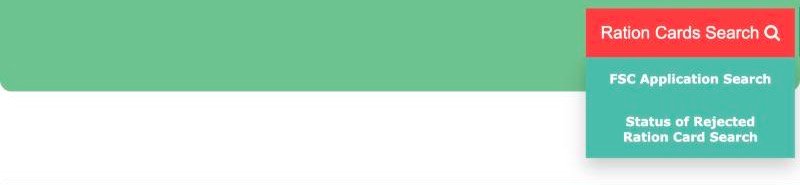
Click FSC Search in the left menu. The next page has a green bar with a Ration Cards Search button (1) at the top right. If you point at that button, a small menu opens with two other searches (2): FSC Application Search and Status of Rejected Ration Card Search. You will use those later if you applied recently or if your card was rejected. For an existing card, stay on this page. The form headed "FSC Ration Card Search" is right below.
 12
Step 3: Pick the search option and type your number
The form gives you three radio buttons. Choose FSCRefNo (1) if you have the FSC reference number, RationCard No (2) for the new ration card number, or Old RationCard No (3) for the number from the earlier system. The text box for the number sits under the first option. Pick the option that matches the number you are typing. A card number typed under the wrong radio button is the most common cause of a failed search.
 123
Step 4: Read the captcha and click Search
Read the captcha shown in the box (1) and type it into "Enter Captcha Here". If you cannot read it, press Refresh (2) and a new one appears. Then click the blue Search button (3).
 123
Step 5: Read the result
When the search works, the block headed "RATION CARD DETAILS" (1) fills in, and the "RATION CARD MEMBER DETAILS" table (2) lists the family. The next sections explain every field.
 12
The form also has a "Select District" drop-down. If your result does not appear, check that the district shown matches the district where your card was issued.
If the page behaves oddly on your phone, try Chrome on a laptop.
How do you read the Ration Card Details block?
When the search works, the first block you see is headed "RATION CARD DETAILS". Most people glance at the head of family and close the tab. Each line tells you something.
| Field | What it tells you |
|---|---|
| New Ration Card No | The current number of the card. Write this down; you will be asked for it again. |
| FSC Reference No | The reference tied to your household record. Useful if you later search again or talk to an officer. |
| Card Type | The category your household is placed in. It decides what the family is entitled to. |
| Application Status | Where the card stands as a record. Anything other than a normal issued state is a reason to ask questions. |
| Application No | The number of the application that produced this card, handy when you apply for a change. |
| SKS Form No | The number of the survey form linked to the record. Keep it noted; officers sometimes refer to it. |
| Office Name | The civil supplies office that handles the card. This is where you go if you need help in person. |
| FPShop No | The number of the fair price shop (ration shop) your card is attached to. |
| Head of the Family | The person in whose name the card stands. |
| District | The district of the record. |
| IMPDS Status | The record's status in IMPDS, the national system that links state ration data. It matters mainly if you collect rations away from home. |
| Gas Connection / Consumer No | Whether a gas connection, and its consumer number, is shown against the card. |
| KeyRegister Sl.No | The serial number of your card in the shop's key register. The dealer can find your page faster with it. |
| Old RCNo | The earlier ration card number, so old and new records can be matched. |
The three lines to check first
Check FPShop No, Application Status and the district, in that order. A wrong shop number means rations are being sent to a shop the family never visits. An unusual application status means the card may not be fully active. A wrong district means the record belongs to a different place than you thought.
If the result shows a shop in an area you no longer live in, the shop mapping was probably never updated. Ask the civil supplies office about a shop change, and see fair price shop details in Telangana.
What does the Ration Card Member Details table show?
Below the card block is "RATION CARD MEMBER DETAILS", a table that starts with S No and Member Name and continues with more columns to the right. On a phone you may need to scroll sideways to see them.
Go down the list slowly and compare it with the people living in your house:
- Is every living family member there, including newborns and a newly married daughter-in-law?
- Is anyone listed who has passed away or moved out?
- Are the names spelled the way they appear on Aadhaar cards? Spelling gaps cause trouble later.
If the list is wrong, note the exact mistake. The fix is not on this page; see adding or removing members on a Telangana ration card. If your problem is verification, our Telangana ration card e-KYC page covers what we know about it.
FSC search Telangana with Aadhaar card or mobile number: is it possible?
No. The form has no box for Aadhaar or a mobile number, and any site claiming otherwise is either wrong or collecting your details. If you only know your mobile number or name, read FSC search by mobile number or name for practical ways to trace a lost number. Once you have the card number, come back to the three options above.
FSC search with shop number: what the portal does and does not do
This is one of the most typed phrases, so here is a plain answer. The FSC Search form accepts FSCRefNo, RationCard No and Old RationCard No. It does not accept a shop number as the thing you type. The shop number appears in the other direction: after a successful search, the Ration Card Details block shows FPShop No, the number of the fair price shop your card is attached to.
So the working route is: search your card, read FPShop No, and write it down. You will need it when you complain, ask for a shop change or look at shop-level reports. See fair price shop details in Telangana for what to do with it.
FSC Telangana shop list: how to see cards shop wise
People also search for an "FSC Telangana shop list". The FSC Search page itself does not show one. Our fair price shop guide describes a separate card status report in the Reports section of the portal, where you choose a district and then a shop number to see the cards mapped to that shop. Menu names change when the site is updated, so open Reports yourself and confirm. We did not run that report for this page.
FSC search Telangana ration card download: can you save the result?
The FSC search result is shown on screen. We did not find a download button on the result block when we looked. For a downloadable copy of the card, read FSC card download in Telangana. To keep a record of the search itself, note the New Ration Card No, FSC Reference No and FPShop No on paper or take a screenshot for your own use.
FSC search Telangana KYC and MeeSeva application status
Two more phrases people attach to FSC search. For KYC: the result fields we describe above do not include a line named eKYC. The closest is IMPDS Status. eKYC is normally done at the fair price shop on the ePoS device, which is explained in Telangana ration card e-KYC; ask your dealer to confirm each member's status. For MeeSeva application status, use FSC Application Search from the Ration Cards Search button, pick your district and enter the MeeSeva No or Application No. Steps are in FSC application search.
FSC search Telangana new ration card list
If you are looking for a list of newly approved cards, the FSC Search form does not provide one; it shows one household at a time. For a pending application use the application search, and for how new cards are applied for see Telangana new ration card apply. We did not verify a public new-card list on the portal.
FSC search Telangana kaise kare (Hinglish)
epds.telangana.gov.in kholiye, banner band kijiye, FSC Search dabaiye. Teen option me se ek chuniye (FSCRefNo, RationCard No ya Old RationCard No), number daaliye, captcha bhariye aur Search dabaiye. Result me Ration Card Details aur member list dikhegi. Aadhaar ya mobile number se search ka option nahi hai.
What other searches are in the Ration Cards Search menu?
On the FSC Search page, top right, there is a button called Ration Cards Search. Click it and a small menu opens (the same one shown in step 2) with FSC Application Search, Status of Rejected Ration Card Search, and Home.
FSC Application Search
For people who applied and are waiting. The page is headed "MeeSeva Application Search": pick your district, choose MeeSeva No or Application No, type it and press Search. The result includes lines such as Pending At and Rejected Reason. Full walk-through: FSC application search in Telangana.
Status of Rejected Ration Card Search
One field, "RationCard No", and a Search button. If the result shows a rejection, read ration card rejection reasons and reapplying before doing anything else.
| Your situation | Use this | You type |
|---|---|---|
| I hold a card and want to see it | FSC Search | FSCRefNo, RationCard No or Old RationCard No |
| I applied recently and card has not come | FSC Application Search | District plus MeeSeva No or Application No |
| I was told my card was rejected | Status of Rejected Ration Card Search | RationCard No |
Why does it say "record not found", and what can you try?
Before you assume the card has been deleted, run through this list in order. It solves most cases.
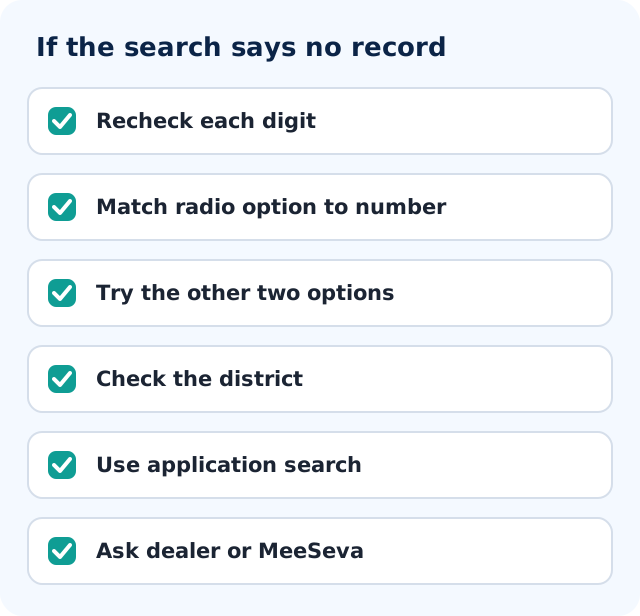
- Check every digit. One swapped digit is enough. Read the number aloud from the card, one digit at a time, as you type.
- Check the radio button. If you typed the current card number under "Old RationCard No", the search fails. Switch it.
- Try the other two options. If you have an old booklet and a new smart card, try both numbers.
- Look at the district. It should be the district where the card was issued, not necessarily where you live now.
- Refresh the captcha, type it slowly, and try again later if the site is slow.
- If you applied recently, use FSC Application Search instead. A pending application will not show as a card.
Still nothing? Then take the number to a person. The fair price shop dealer can check their register. A MeeSeva centre can help you search or apply. The civil supplies office named in your old papers can tell you what happened to the record. Ask for a receipt if any genuine fee is charged.
For complaints, the portal prints a toll-free helpline on the home page: 1967 and 1800 425 00333. The Telangana grievance system at tgspdsgrams.telangana.gov.in is described there as a 24x7 call centre for PDS grievances, with the number 1967. You can also see our page on Telangana civil supplies grievance.
Is the FSC search free and safe?
It is free. The portal does not ask for a fee, and you do not need to log in. The "Please Sign In Here" box on the right of the home page, with user name, password and captcha, is for registered portal users. You can ignore it.
A few safety habits:
- Use only the official address, epds.telangana.gov.in. The page footer says it is designed, developed and hosted by NIC, Telangana State Centre, with content managed by the Commissioner of Civil Supplies, Hyderabad.
- Never pay an agent to "search" your card. The lookup costs nothing.
- Never share your OTP with anyone who calls about your ration card. This search does not use OTP at all.
Our overview of the card itself is at Telangana food security card; the national law is explained on nfsa.gov.in.
Conclusion
FSC search in Telangana is short once you know the layout: open the EPDS portal, close the banner, click FSC Search, choose one of the three number options, solve the captcha and press Search. Then read the shop number, status, district and member list slowly. If the record is not found, check digits, switch the option, try the old number, and ask the dealer, a MeeSeva centre or the civil supplies office. If you collect rations away from home, see One Nation One Ration Card.
Frequently asked questions
How do I do FSC search in Telangana?
Open epds.telangana.gov.in, close the pop-up banner, and click FSC Search in the left menu. Choose FSCRefNo, RationCard No or Old RationCard No, type the number, enter the captcha and press Search.
FSC search Telangana kaise kare?
epds.telangana.gov.in par FSC Search dabaiye, teen option me se sahi number type chuniye, number aur captcha daaliye aur Search dabaiye. Aadhaar ya mobile number se search nahi hota. Record na mile to har digit aur district dobara dekhiye.
Can I do FSC search with a shop number?
No. The form accepts the FSC reference number, the ration card number or the old ration card number. The shop number is shown in the result as FPShop No after you search your card. A shop-wise card report is a separate item in the Reports section.
Can I do FSC search with Aadhaar or a mobile number?
No. The FSC Ration Card Search form has no field for Aadhaar or a mobile number. It works only with the three card numbers. If you lost your number, try old SMS and receipts, the dealer, or the civil supplies office.
Why does it say record not found?
Usually it is a typing error, the number entered under the wrong radio option, or the wrong district. Check every digit, try the other two options, refresh the captcha and retry. If you applied recently, use FSC Application Search. Still failing? Ask the dealer or the civil supplies office.
Do I need to log in for FSC search?
No. The search needs no login, no password, no Aadhaar and no OTP. The Sign In box on the home page is for registered portal users.
What is the difference between FSC search and FSC application search?
FSC Search shows a card that already exists, using FSC reference, card or old card number. FSC Application Search is under the Ration Cards Search menu and is for applications. It asks for a district and a MeeSeva number or application number, and shows items like Pending At and Rejected Reason.
What do FPShop No and IMPDS Status mean on the result page?
FPShop No is the number of the fair price shop your card is attached to, which tells you where to collect rations. IMPDS Status shows the record's status in the national IMPDS system that links state ration data, which matters mainly if you collect rations away from home.