EPDS Telangana reports are public report pages on the Civil Supplies portal, including the FSC card status report, the seeding report and the FPShop details report. Most open without a login, but they show district and shop-level data, not your private record.
- What are EPDS Telangana reports?
- EPDS Telangana reports at a glance
- EPDS Telangana reports online: where is the Reports menu?
- What reports are listed?
- EPDS Telangana reports FSC card: what does the FSC Card Status Report show?
- What does the Seeding Report show?
- What does the FPShop Details Report ask for?
- What do the Monthly KeyRegister and Allocation reports ask for?
- What is the Welfare Institutions Report?
- What is Deepam Search?
- What is SMS Registration?
- EPDS Telangana reports by Aadhaar number or ration card status check: is it possible?
- EPDS Telangana ration card details and ration card list: where to look
- EPDS Telangana reports login, download and PDF
- What can an ordinary card holder do with these reports?
- Safety tips
- Conclusion
Most people use the EPDS Telangana portal for one thing, the FSC card search. But the left menu has more: a Reports section, a Deepam Search, and an SMS Registration link. This guide walks through what each of them opens, based on what I saw on the live pages on 20 October 2026. This website is independent and is not the Telangana government.
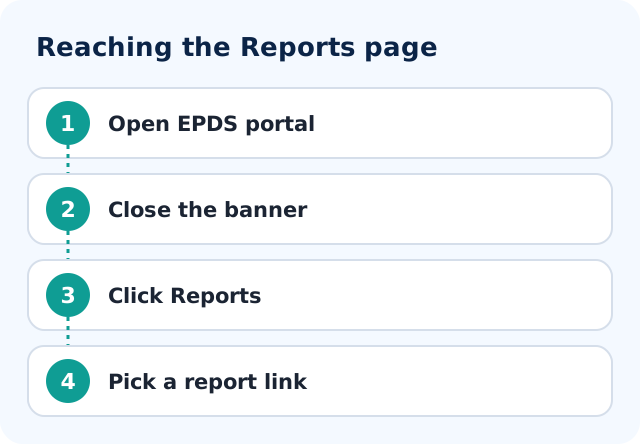
- Open epds.telangana.gov.in, close the banner and click Reports in the left menu.
- You will see seven report links under three headings: Welfare Institutions, Ration Cards Reports, and KeyRegister & Allocation Reports.
- The card status and seeding reports open straight into district-wise tables; the others ask you to choose a district, month or year first.
- None of them looks up one family. For your own card, use FSC Search instead.
What are EPDS Telangana reports?
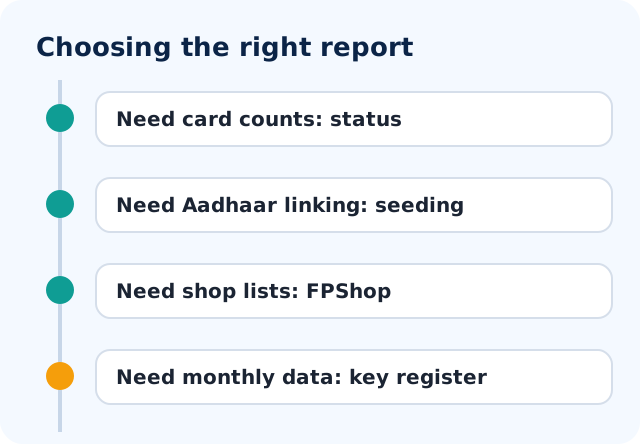
EPDS Telangana reports are the tables and forms listed under Reports on epds.telangana.gov.in, the Telangana civil supplies portal. They are mostly district-level tables meant for officials and researchers: how many ration cards each district holds, how many are linked to Aadhaar, which fair price shops are active, and what a shop or district was allotted in a month. A card holder can open several of them without logging in, but none of them shows your own household. For one family, the portal has a separate FSC Search.
EPDS Telangana reports at a glance
| Item | Details |
|---|---|
| Portal | epds.telangana.gov.in (designed and hosted by NIC, Telangana State Centre; content managed by the Commissioner of Civil Supplies, per the footer) |
| Where | Reports in the left menu |
| Number of reports | Seven links under three headings |
| Login needed | Not for the pages we opened on 20 October 2026 |
| Fee | Not stated on the official page; none asked |
| Aadhaar number or OTP | Not asked on any report we opened |
| Helpline printed on home page | 1967 and 180042500333 (toll free) |
| Shows your own card? | No |
EPDS Telangana reports online: where is the Reports menu?
Open epds.telangana.gov.in. The page is titled Food Security Act and greets you with "Welcome to NATIONAL FOOD SECURITY CARDS". A full-screen banner appears first; close it with the cross at the top right.
The left menu on 20 October 2026 had these items, in order: FSC Search, Deepam Search, Reports, Electronic Point Of Sales (ePos) Portal, Supply Chain Management, SMS Registration, Grievance Redressal System for E2E PDS, and Download Mobile Applications. The helpline line below the menu reads "Toll Free Consumer help line Services : 1967 & 180042500333".
Click Reports and a new page loads. One practical warning: the links on this portal carry session codes. If you copy a report link and open it later, you may see "Page Expired". Always start from the home page and click through.
What reports are listed?
The Reports page groups its links under three headings. Here is the full list as it appeared, with the first thing each one asks you.
| Heading | Report link | What happens when you open it |
|---|---|---|
| Welfare Institutions Reports | Welfare Institutions Report | Form with a district drop-down and a year drop-down |
| Ration Cards Reports | GHMC FSC Card Status Report | Table opens directly |
| Ration Cards Reports | FSC Card Status Report | Table opens directly |
| Ration Cards Reports | Seeding Report | Table opens directly, with All / NFSC / SFSC options |
| Ration Cards Reports | FPShop Details Report | Form: district, office, shop status, shop type |
| KeyRegister & Allocation Reports | Monthly KeyRegister Report | Form: month, year, district, mandal, shop |
| KeyRegister & Allocation Reports | Allocation Reports | Form: district, commodity, month, year, partial or full allotment |
I opened each page and read the fields. For the forms that need a selection I did not generate a report, so I describe the choices but not the output columns.
EPDS Telangana reports FSC card: what does the FSC Card Status Report show?
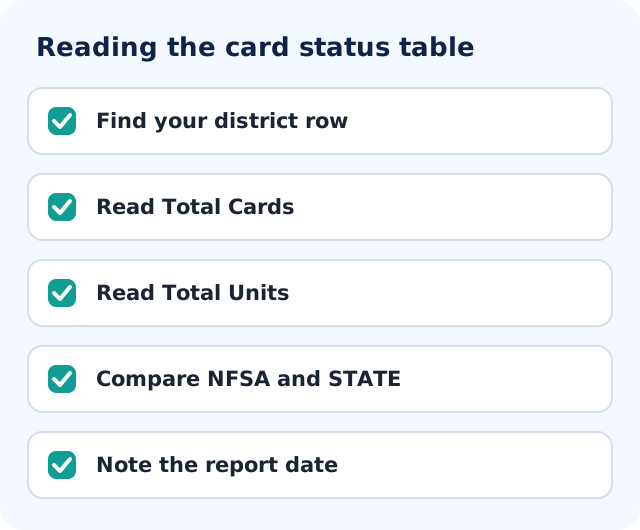
This is the report most visitors will actually read. When I opened it, the heading said "Telangana State FSC Ration Card Status Report" with a generation stamp of 20-Oct-2026, 02:30 AM. It lists all 33 districts, from Adilabad to Yadadri Bhuvanagiri, one row each, plus a total row.
The columns are grouped under three heads:
- NFSA: AAY cards and units, Priority Household cards and units, and total cards and units. These are the cards under the National Food Security Act.
- STATE: AAY, Priority Household and AAP cards and units, with state totals. These are the cards on the state's own list.
- TOTAL: all cards and all units together.
"Units" here means the members counted on the cards, so a card with four members adds one card and four units.
The totals row on that day read 10,665,812 cards and 34,358,408 units for the whole state. Of these, the NFSA group showed 5,704,291 cards and the STATE group 4,961,521 cards. These are snapshot figures from a page that regenerates, so treat them as the value on that morning, not a fixed number.
How to use it
If you want to know how many cards your district holds, find the district row and read the TOTAL cards column. For example, the Hyderabad row showed 839,397 cards. The report cannot tell you whether your own card is active; for that, run the FSC search.
The GHMC version
The GHMC FSC Card Status Report uses the same columns but covers only four districts: Hyderabad, Medchal, Ranga Reddy and Sangareddy. Its total row showed 1,595,129 cards and 5,841,785 units on 20 October 2026. The four rows add up to the GHMC figure and are a share of the state numbers, because these districts are only partly inside the corporation area. I could not find a note on the page defining the GHMC boundary, so I cannot say how the split is made.
What does the Seeding Report show?
The page is headed "District Wise Seeding Report as on 20-Oct-2026 02:30 AM". Above the table are three options: All, NFSC and SFSC. The table has these columns:
| Column | Label on the page |
|---|---|
| B | Total Units |
| C | Aadhaar Seeded Cards |
| D | Aadhaar Seeded Units |
| E | Units with UID Blank |
| F | % Seeding, shown as (C/B)*100 |
| G | Bank Seeding |
| H | Mobile Seeding |
Column A is Total RationCards. The page shows the letters A to H under the headings.
Seeding means the Aadhaar, bank or mobile detail is linked to the ration card record. The state total row on that date read 10,603,911 ration cards, 34,163,462 units, 5,315 units with UID blank, a seeding percentage of 99.98, 1,250,661 for bank seeding and 10,119,436 for mobile seeding. I did not find a definition note on the page, so I read those two columns as counts of linked records, based on their labels. Please confirm the exact meaning with the department if you need to quote them.
One thing to notice: the card total here (10,603,911) is not the same as the card total on the status report (10,665,812). The two reports are separate tables and I found no explanation of the gap on the pages. If you quote either figure, name the report and the date.
What this report is not
It does not tell you whether your Aadhaar is linked. If you want to understand why linking matters for ration collection, read our guide on ration card Aadhaar linking.
What does the FPShop Details Report ask for?
FPShop means fair price shop, the ration shop. The form has four drop-downs, and the page checks them before it lets you submit:
- District: all 33 districts, each shown with a code number next to the name.
- Office: a second drop-down that depends on the district.
- FPShop Status: All, Active or Inactive.
- FPShop Type: All, Normal, or Kerosene shops.
This is useful if you want to know how shops in your office area are listed, including whether a shop is marked active. For finding the shop your own card is tied to, the FSC search result shows an FPShop number; see fair price shop details in Telangana for how to read it.
What do the Monthly KeyRegister and Allocation reports ask for?
Monthly KeyRegister Report
The form asks you to select a month, a year (2015 to 2026 were offered), a district, a mandal and a fair price shop. The district, mandal and shop lists each include an "All" choice. The key register is the shop's record of cards and sales, and this report lets you pull it for a month. I did not generate a report, so I cannot describe the output columns.
Allocation Reports
This form asks for a district (or All), a commodity, a month and a year, and a choice between Partial Allotment and Full Allotment. The commodity list on the page was long: Rice, Wheat, Sugar, Kerosene Oil, Redgram Dal, Palmolein Oil, whole Meal Atta, Salt, Chilli Powder, Turmeric Powder and Tamarind. That list shows the portal can report on many items, not that every item is being supplied today. I did not run the report, so I make no claim about what is currently allotted.
If your interest is stock held at a shop right now, the ePoS side has its own page, explained in ePoS Telangana closing balance.
What is the Welfare Institutions Report?
The page is titled "Monthly Welfare Institutions Report". It has a district drop-down and a year drop-down with financial years from 2017_18 to 2026_27, and three buttons: Generate Report, Download Excel and Print. The page does not explain what a welfare institution is, so I do not define it here. I did not generate the report.
What is Deepam Search?
Click Deepam Search in the left menu and the next page is headed "Deepam Application Search". There is one box, labelled FSC No, and a Search button. I saw no captcha and no other field on the page.
That is all I could verify. The page itself does not describe the Deepam scheme, and I did not enter a card number, so I do not know what the result displays. I will not guess here that it is about gas connections or any benefit; the portal's own FSC result page does show a "Gas Connection / Consumer No" line, but that is a separate page. If you need Deepam details, ask the civil supplies office named on your card record. You can find that office in the FSC search result, as explained in our EPDS Telangana ration card check guide.
What is SMS Registration?
SMS Registration is a menu item on the same left menu. It does not open a page on epds.telangana.gov.in. The link points to a page on the Supply Chain Management site: scm.telangana.gov.in/SCM/Registration.jsp. The home page of that site carries the title "Supply Chain Management - TSSCSC".
When I tried the registration address on 20 October 2026, my browser tool could not open it and a direct request was redirected to an error page on the same site. So I did not find, on that day, any form, field or instruction. I cannot say who the registration is for, what number it wants or what messages it sends. I also found no explanation of it on the EPDS home page.
The Supply Chain Management home page does show a menu for logged-in users, including Allotment Order, Digital Token and MIS Reports. That suggests the site is mainly a back-office system for the supply chain, but this is my reading of menu names only. Please do not treat SMS Registration as a card-holder service unless an official page says so.
EPDS Telangana reports by Aadhaar number or ration card status check: is it possible?
No. None of the seven report pages we opened has a box for an Aadhaar number, and none takes a ration card number. They cannot tell you your ration card status. Use FSC Search for that, with your FSC reference number, card number or old card number; our EPDS Telangana ration card check guide shows the steps. We did not find any official page that lets you pull a report by Aadhaar. Treat a site that asks for your Aadhaar to "generate your EPDS report" as unsafe.
EPDS Telangana ration card details and ration card list: where to look
People often type "ration card list" hoping for a village-wise list of names. The Reports menu has no such list. What it does have is district totals in the FSC Card Status Report and a list of shop records through the FPShop Details Report. For your own card details, such as card type and members, run FSC Search instead.
EPDS Telangana reports login, download and PDF
- Login: the card status and seeding reports opened without one. The Sign In box on the home page is for registered users, and we did not use it.
- Download: the Welfare Institutions Report page shows Generate Report, Download Excel and Print buttons. The other pages we opened did not show a download button, and we did not see a PDF option on any of them. If you need a file, use your browser's print option on the table page and check the result yourself.
- Page Expired: see the note under the Reports menu above. Start again from the home page.
What can an ordinary card holder do with these reports?
Several reports open without any login: the card status reports, the seeding report and the forms above. The portal also has a "Please Sign In Here" box on the home page for registered users, and I did not use it. Here is a quick way to decide.
- Want to see your own card? Use FSC Search. Reports are not family-level.
- Applied recently? Use the FSC application search.
- Have a complaint about a shop? Use the grievance route in Telangana civil supplies grievance.
- Want district numbers for a study or a news story? The card status and seeding reports are the right place, with the date noted.
Safety tips
- Type epds.telangana.gov.in yourself. The footer says the application is designed, developed and hosted by NIC, Telangana State Centre, with content managed by the Commissioner of Civil Supplies, Hyderabad.
- No report asks for Aadhaar, OTP or a fee. If a page claiming to be a report does, close it.
- Do not pay anyone to "pull a report" for your ration card. These pages are free to open.
- Do not enter your card number on a Deepam or SMS page unless you reached it from the official portal menu.
Conclusion
The Reports menu on EPDS Telangana is a set of district and shop-level tables, not a personal status page. The FSC card status and seeding reports give state-wide counts, while the FPShop, key register, allocation and welfare reports start with a form. Deepam Search is a single-box lookup whose purpose the page does not explain, and SMS Registration points to a separate site that did not open for me. For your own family, go back to FSC Search and the guides linked above.
Frequently asked questions
Where are EPDS Telangana reports online?
Open epds.telangana.gov.in, close the banner and click Reports in the left menu, below FSC Search and Deepam Search. The next page lists seven report links under three headings.
Can I check my ration card status in EPDS Telangana reports?
No. The reports I opened are district or shop level and none of them takes a ration card number. For one household use FSC Search with your FSC reference, card number or old card number.
Are EPDS Telangana reports available by Aadhaar number?
We found no report page with an Aadhaar box. Do not give your Aadhaar number or OTP to any site that offers to pull a report for you. For a personal record, use FSC Search on the official portal.
Do I need to log in to see EPDS Telangana reports?
The card status and seeding reports opened without any login on 20 October 2026, and the form-based reports showed their fields without signing in. The Sign In box on the home page is for registered users.
Can I download an EPDS Telangana report or get a PDF?
The Welfare Institutions Report page has Generate Report, Download Excel and Print buttons. The other pages did not show a download button, and I saw no PDF option. Use the print option of your browser if you need a copy, and note the report date.
What does the EPDS seeding report show?
It is a district-wise table with total ration cards, units, Aadhaar seeded cards and units, units with UID blank, a seeding percentage, bank seeding and mobile seeding. On 20 October 2026 the state percentage on the page was 99.98.
What is Deepam Search or SMS Registration on the EPDS Telangana menu?
Deepam Search is a single-box page labelled FSC No; the page does not explain the scheme and I did not search. SMS Registration links to scm.telangana.gov.in/SCM/Registration.jsp, which did not load for me, so I could not verify it. Ask the civil supplies office or call 1967.
Why does an EPDS report link say Page Expired?
The portal links carry session codes. If you save a link or press back after submitting a form, the page may say it has expired. Go back to the home page and click through the menu again. The home page also prints the helpline "1967 & 180042500333".